Effective instruction is not only about how content is delivered but also about ensuring that all learners have equitable opportunities to access and interact with instructional materials. Instructors, therefore, have a responsibility to address accessibility barriers within their learning environments. Bong and Chen (2024) explained that faculty need practical skills to apply accessibility principles in their teaching practices. Such skills include creating accessible documents, presentations, and assessments, as well as designing courses using Universal Design for Learning (UDL) principles.
Evaluating Accessibility
To apply accessibility principles in practice, I evaluated a Word learning object titled Orchards and Vineyards, which presented instructional content about planting fruit trees and grafting procedures. The document contained relevant instructional text, identifiable section headings, and images that supported the content. However, several design elements presented potential accessibility barriers. Riordan et al. (2024) emphasized the importance of accessible document structures, appropriate color contrast, and alternative text for instructional images.
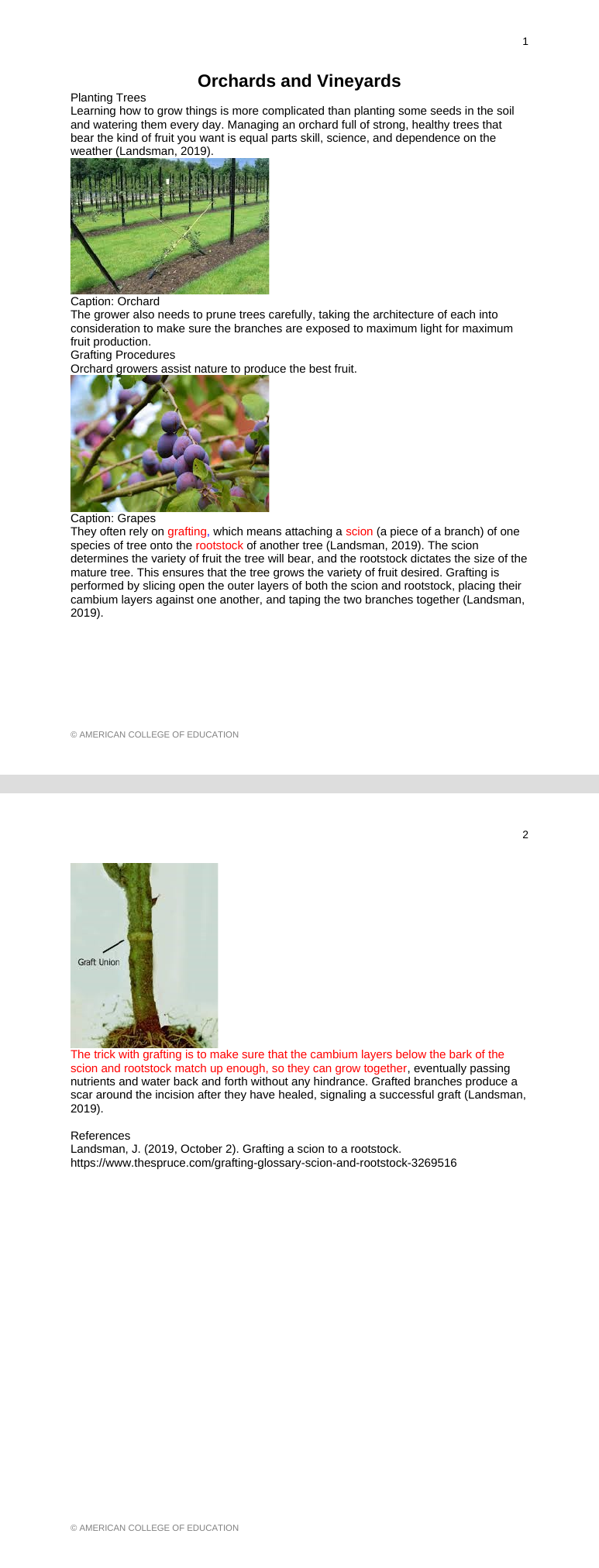
Text description: Before
The original two-page document has a centered title and visually labeled Planting Trees and Grafting Procedures sections. The orchard and grapes photos appear left-aligned with brief captions. Red words emphasize grafting terminology, and a later paragraph appears in red. A graft-union photograph appears without a visible caption.
Accessibility Improvements
My review identified several opportunities to improve the accessibility of the learning object. The revisions included:
- Document structure: The original document included identifiable section headings but did not use Word’s built-in heading styles. I applied the Title and Heading 1 styles to establish a logical structure and support screen-reader navigation, as recommended by WebAIM (2021).
- Alternative text: Although the document contained relevant instructional images, they lacked alternative text. I added descriptions to convey their instructional meaning to screen-reader users (Riordan et al., 2024; WebAIM, 2021).
- Color contrast: Red text emphasized important terminology but presented contrast concerns. I adjusted the shade of red while preserving its instructional purpose. WebAIM (2021) emphasizes sufficient contrast, while Riordan et al. (2024) recognize color’s instructional value when accessibility is considered.
- Image captions: The original document contained inconsistent captions, and one image lacked a caption. I used Word’s Insert Caption feature to standardize the captions, added a caption for the graft union image, and increased the caption font size to 12 points for readability.
- Text formatting: I standardized font size and paragraph spacing to improve readability and consistency, following WebAIM’s (2021) guidance on legible text.
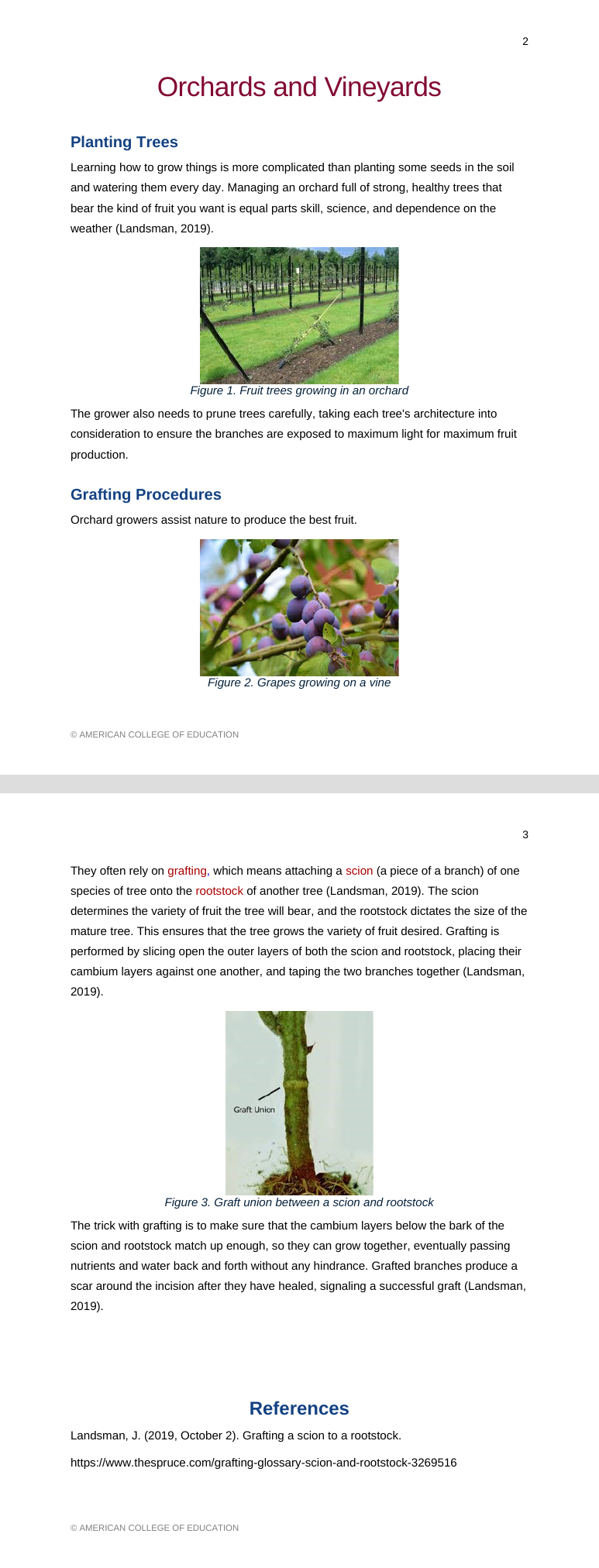
Text description: After
The revised document uses prominent styled headings, centered orchard and grapes photographs, and numbered, descriptive captions. The graft-union photograph now has a visible Figure 3 caption. The terminology uses a darker red, and the later paragraph appears in regular dark text. The References heading is prominently styled.
Recommended Accessibility Resources
Three resources can support educators in evaluating and improving instructional materials:
- Microsoft Word Accessibility Checker: Identifies potential accessibility barriers, including missing alternative text.
- WebAIM: Provides practical guidance for creating accessible Word documents and evaluating digital content.
- Web Accessibility Initiative (WAI): Introduces accessibility principles and resources for accessible online content.
Automated tools are useful starting points, but manual review remains necessary to evaluate instructional meaning and usability.
Reflection and Professional Practice
The assessment reinforced that accessibility involves more than visual presentation. I was particularly interested in how heading styles support screen-reader navigation and how assistive technologies interpret tables. The activity also demonstrated that instructional design decisions, such as using color for emphasis, can be retained while addressing accessibility concerns.
Bong and Chen (2024) recommend flexible faculty development that combines accessibility regulations, standards, and hands-on practice. Incorporating similar activities into faculty development and routine instructional material reviews could strengthen accessibility practices across an institution. Accessibility should be considered throughout course design rather than addressed only after barriers are identified.
References
Bong, W. K., & Chen, W. (2024). Increasing faculty’s competence in digital accessibility for inclusive education: A systematic literature review. International Journal of Inclusive Education, 28(2), 197–213. https://doi.org/10.1080/13603116.2021.1937344
Riordan, E., Miladinović, D., Dempsey, M., Manhartsberger, S., & Mortell, S. (2024). Exploring the challenges of making digital language learning materials accessible. All Ireland Journal of Higher Education, 16(2).
Web Accessibility Initiative. (2023, August 8). Accessibility fundamentals overview. https://www.w3.org/WAI/fundamentals/
WebAIM. (2021, February 26). Microsoft Word: Creating accessible documents. https://webaim.org/techniques/word/


Leave a Reply